Verified 15 September 2026.
TikTok Creative Center is TikTok’s public research desk for ads. It is not Ads Manager. It is not Symphony. It is not CapCut.
You go there to see which ads already cleared performance thresholds in your region and industry — then you steal the pattern, not the footage.
URL: ads.tiktok.com/business/creativecenter
Log in with a TikTok for Business account. Logged-out users see five ads. Logged-in users get the filters that make the tool worth a tab.
If you are about to open a new Ads Manager to claim the match, do this research before signup. The 30-day clock does not wait while you browse.
What lives inside Creative Center
| Module | Job |
|---|---|
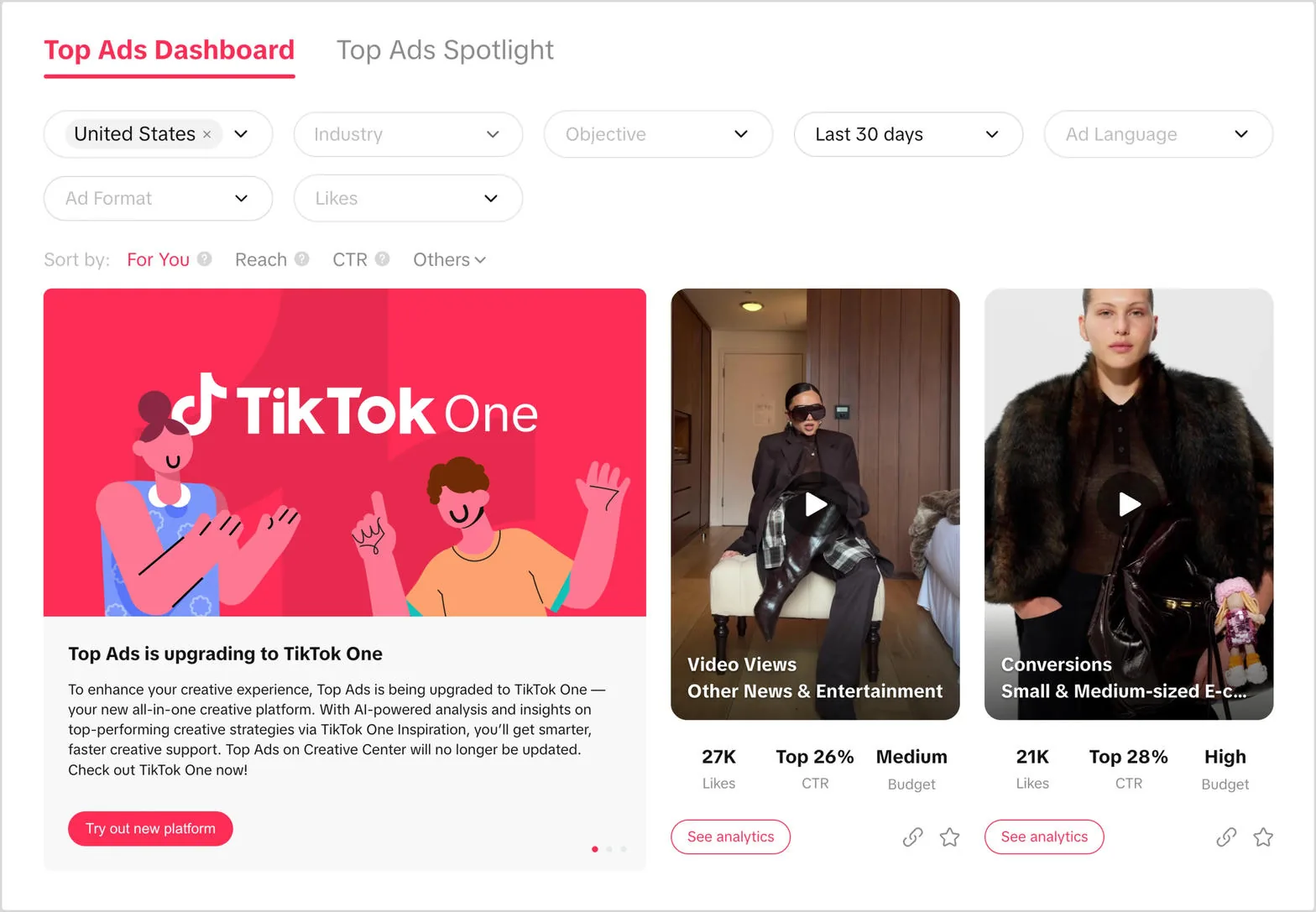
| Top Ads | Authorized high-performing ads. Filter by region, industry, objective, format, language |
| Top Products | Products showing up in ads. Desktop only |
| Symphony Assistant | Chat inside Creative Center for trends and scripts. Generation itself lives in Symphony |
| Inspiration / trends | Sounds, hashtags, rising formats |
| My Collections | Starred ads under your profile |
Official Help (Top Ads, last updated May 2025, still the live UI in 2026): ads in the dashboard are authorized by the advertiser inside Ads Manager. You are not looking at a leaked library. You are looking at ads brands agreed to show.
Top Ads: the only workflow that matters
- Open Creative Center on desktop. Log in.
- Inspiration → Top Ads.
- Filter in this order: Region → Industry → Objective → Format.
- Run the same filters twice: last 7 days and last 30 days.
- Sort by the metric you will actually buy. Reach is vanity if you are here for purchases. Desktop also sorts by CVR and likes.
- Hover to autoplay. Open See Analytics.
- Read the second-by-second graph. Official indexing: 0–100, 100 is the peak second for that metric. That is the hook timestamp.
- Star the ad into a Collection. Do not download and re-upload someone else’s asset.
A 7-day winner can be a spike. A 30-day winner is a format you can copy structurally: first-frame object, on-screen text style, jump-cut pace, creator vs product-only.
Filters operators actually use
- Region first. US hooks die in Vietnam. VN hooks look cheap in the US.
- Industry next. “E-commerce” is still too wide. Narrow to the vertical you sell.
- Objective must match the campaign you will create. App-install winners are not purchase winners.
- Format: In-Feed and Spark for self-serve tests. Ignore TopView and Branded Effects unless you have a reservation budget. Those floors are five figures: pricing.
- Language on desktop. Mixed-language results waste an afternoon.
Logged-out Creative Center is a demo. Do the work logged in.
Top Products (desktop)
Inspiration → Top Products. Filter region, category, time. Sort by popularity or popularity change. Open Details for audience age/gender, related ads, related hashtags.
Use it when you do not know which SKU to put in front of the camera this week. Do not use it as a supplier list.
How this feeds a 30-day coupon window
Creative Center does not attach credit. It stops you from spending day 1–7 on a format that has been dead in your region for a month.
Day −2 to 0 (before signup):
- Pull 15 Top Ads in your region + industry + In-Feed.
- Write five briefs: hook in second 0–1, proof in 2–5, offer in 6–9, CTA.
- Cut or brief creators. Spark on a post that already has comments beats a cold file.
Day 0: partner page, confirm Promotions, then launch the five cuts — not one brand film.
Days 2–4: kill cells that lose the 2-second view rate vs your Creative Center comps. Replace from the same Collection.
If you sign up first and research later, you have already burned the cheap days of the window. Eligibility: who qualifies.
Creative Center vs Symphony vs CapCut
| Tool | Job |
|---|---|
| Creative Center | Research. What already works |
| Symphony | Generate new clips, avatars, dubs. Symphony page |
| CapCut | Edit. Timeline, captions, export |
Do not generate 20 Symphony clips and skip Top Ads. AI volume without a pattern is how $1,000 of match spend dies at $18 CPM.
Filters that matter before you spend the match
Use this order on desktop, logged in:
- Region = the Ads Manager registration country (US, Vietnam, etc.). Not “worldwide.”
- Industry = yours, then one adjacent industry that already scales on TikTok.
- Objective = the one you will actually run (Sales vs Traffic vs App).
- Last 7 days first for hooks, last 30 for endurance.
- Sort by CTR then by likes. High likes + low CTR is entertainment, not an ad.
For each saved ad, write down: first 1s visual, on-screen text, duration, CTA, landing. Rebuild. Do not download the file.
Then open the partner page only if creatives already exist. How to claim · Symphony · Pricing.